What's New in PerkUp: Event Order-By Dates, International Shipping, and More

What's New in PerkUp: Event Order-By Dates, International Shipping, and More

What's New in PerkUp: Event Order-By Dates, International Shipping, and More

Product Updates

Product Updates

Product Updates

What's New in PerkUp: Event Order-By Dates, International Shipping, and More

What's New in PerkUp: Event Order-By Dates, International Shipping, and More

What's New in PerkUp: Event Order-By Dates, International Shipping, and More

Learn more about PerkUp's latest updates on international shipping, events, and more this October 2026.

Learn more about PerkUp's latest updates on international shipping, events, and more this October 2026.

Learn more about PerkUp's latest updates on international shipping, events, and more this October 2026.

Last Update:

LastUpdate:

Last Update:

•

•

5

5

min read

min read

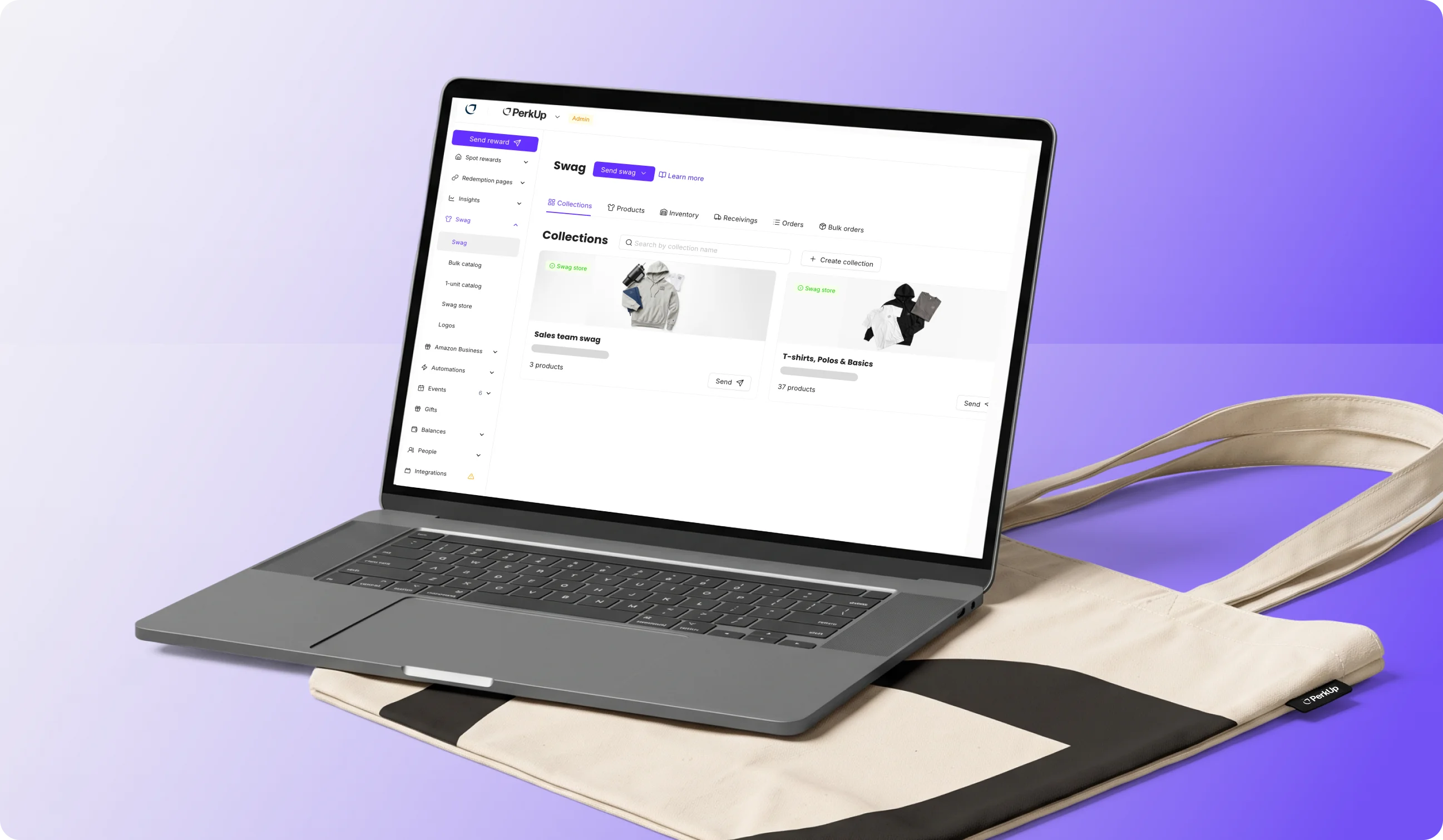
A laptop showing the PerkUp website, with a PerkUp tote bag underneath it.
In this Post

A lot of swag work comes down to small questions. What’s the last day you can order something and still get it in time for an event? Can it ship faster to another country? Can this anniversary rule skip contractors? Can your admins send Amazon Business products without opening the store to everyone?

Until now, you’d have to check each one separately and keep track of it yourself.

We made a few updates to make that easier. You can now see the last day to order each swag item for an event, based on a delivery window. If you’re shipping warehoused swag from the US internationally, you can choose your shipping service at checkout. You can also give each redemption page its own color, exclude groups from automation rules, choose which swag items appear first in a collection, and keep Amazon Business purchasing limited to admins.

Here’s how each one works.


What’s new in PerkUp swag orders?

  1. Check the last day to order for your event
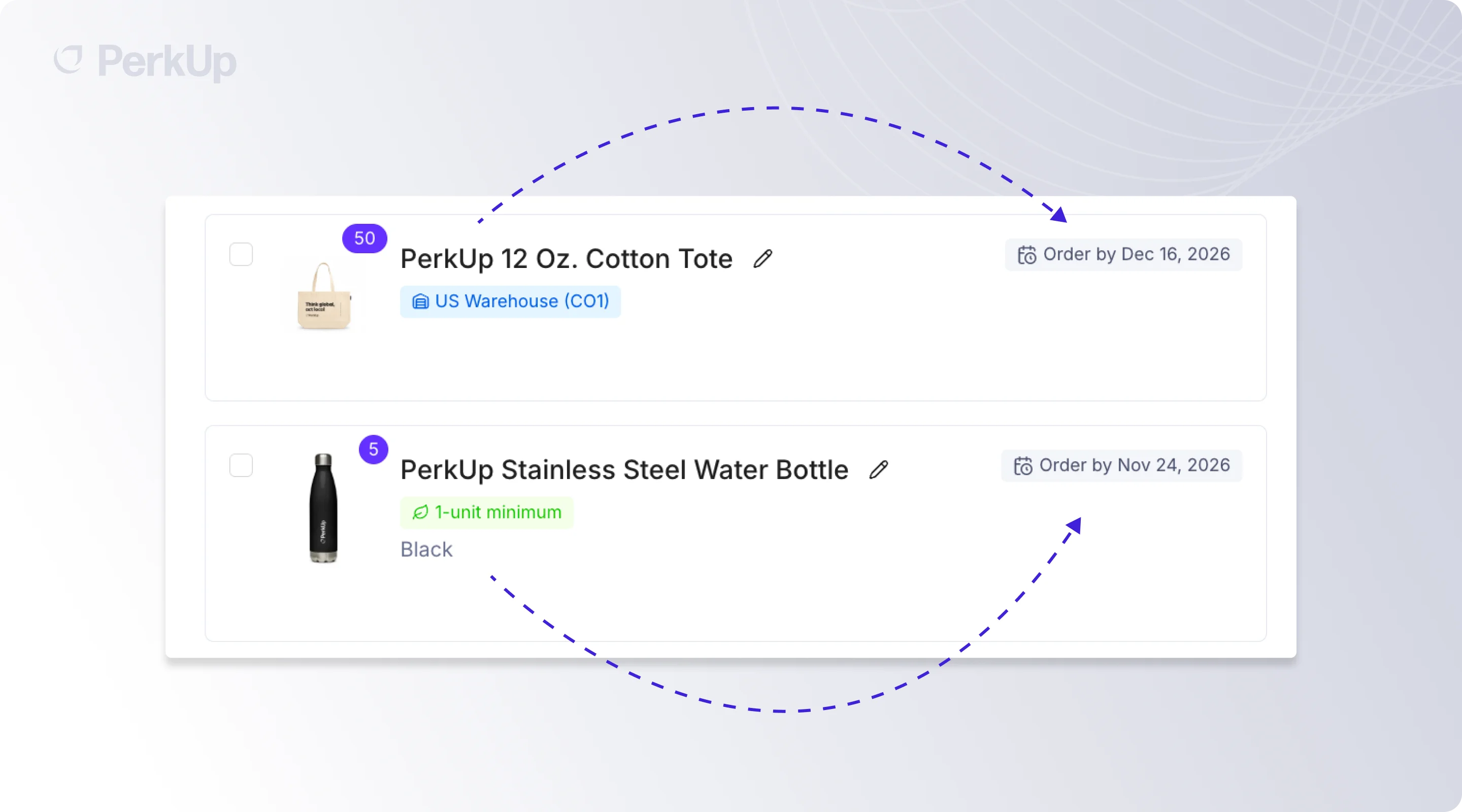
Say you have a conference in Berlin on the 28th. You need hoodies that are already sitting in a PerkUp warehouse in the US, stickers printed in Ohio, and a custom plushie made in China. You can probably wait a little longer to order the stickers, but not the plushie.

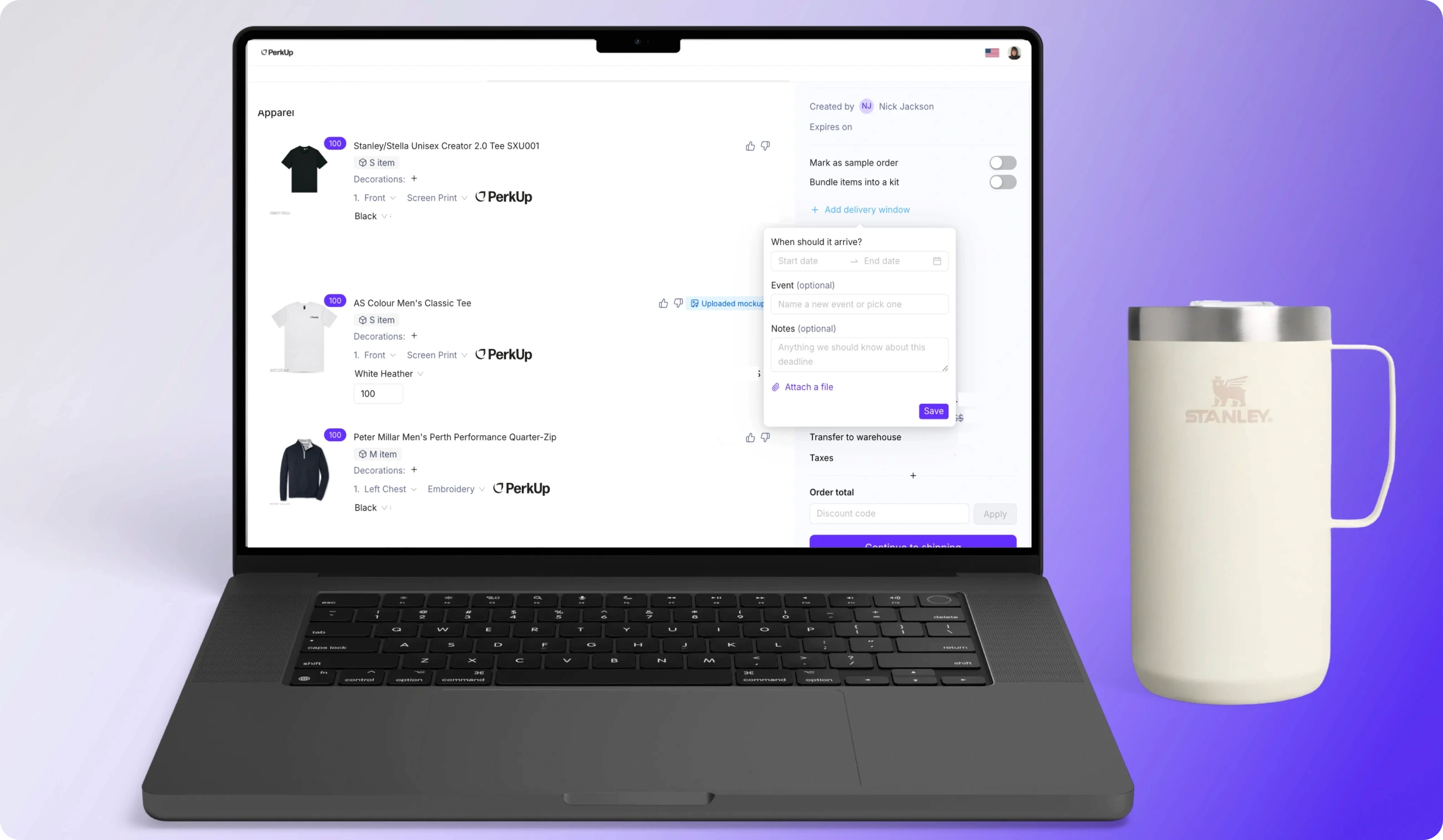
When you add a swag item to an event order, you’ll now see an order-by date. That’s the last day you can place the order and still have it arrive within your delivery window. PerkUp calculates the date based on the swag item’s production time, where it ships from, and how much time you’ll need for proofing. 

You’ll also see order-by dates for bulk orders and warehouse orders (swag you already have warehoused with PerkUp). Additionally, you can also see the full timeline on the event page.

So you’ll see a different deadline for the plushie and the stickers instead of trying to work backward from one event date yourself.

  1. Choose faster shipping for international orders
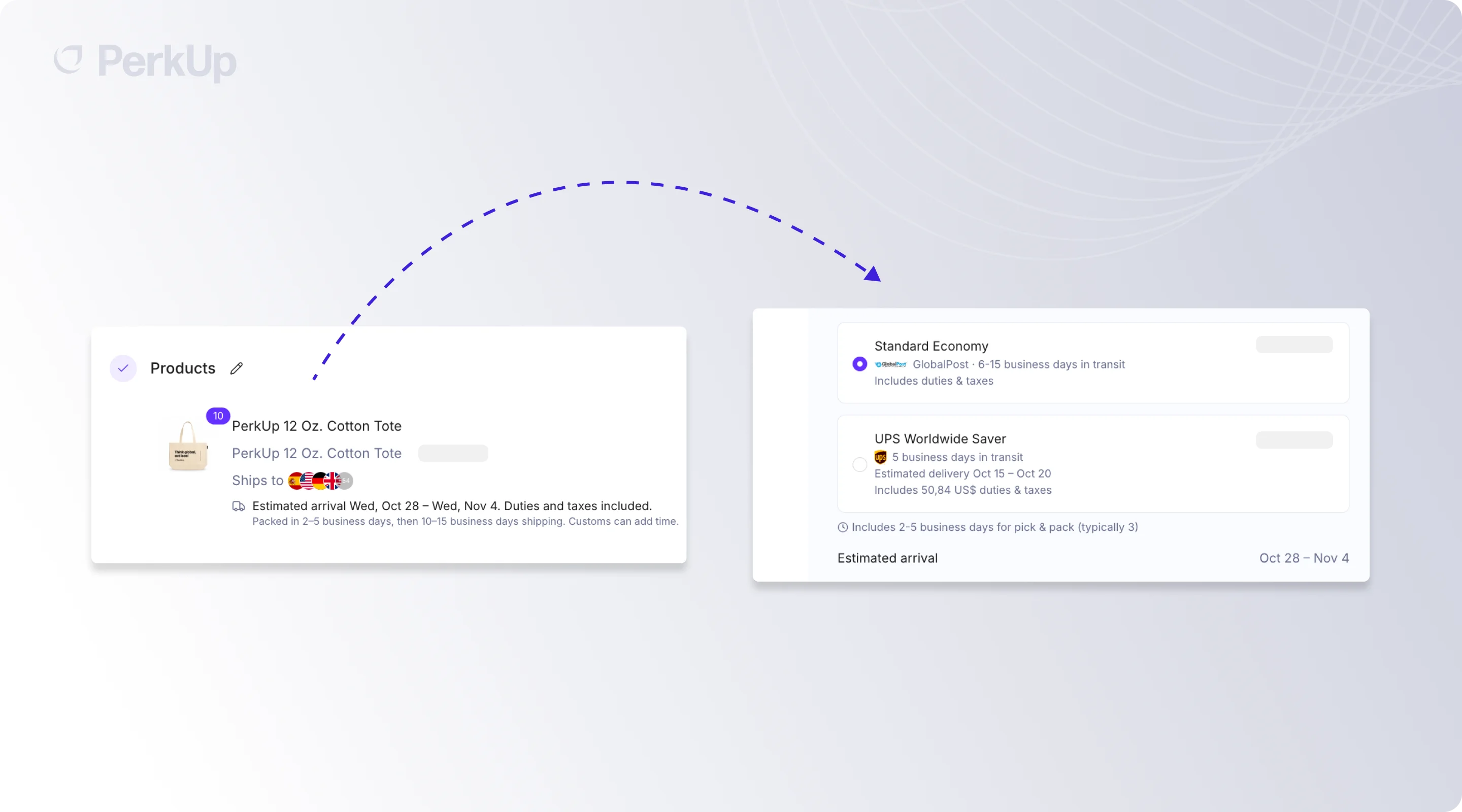
Last month, we added faster shipping methods for US orders. Now you have more options when you ship internationally, too!  If you’re sending swag warehoused with PerkUp in the US to another country, you can choose the carrier and service based on when you need the order to arrive. You’ll also see a delivery estimate based on the option you select before you place the order. 


Other PerkUp Updates

Maybe you’re setting up a redemption page for one client and want it to look different from your other pages. Or you want an anniversary rule to go to everyone except contractors. Or there’s one quarter-zip you want employees to see first in a collection. Or your admins need to send Amazon Business products as rewards, but you don’t want every member to have access to the Amazon Business store.

You can now handle each of those much easier. Here’s how:

  1. Give each redemption page its own color
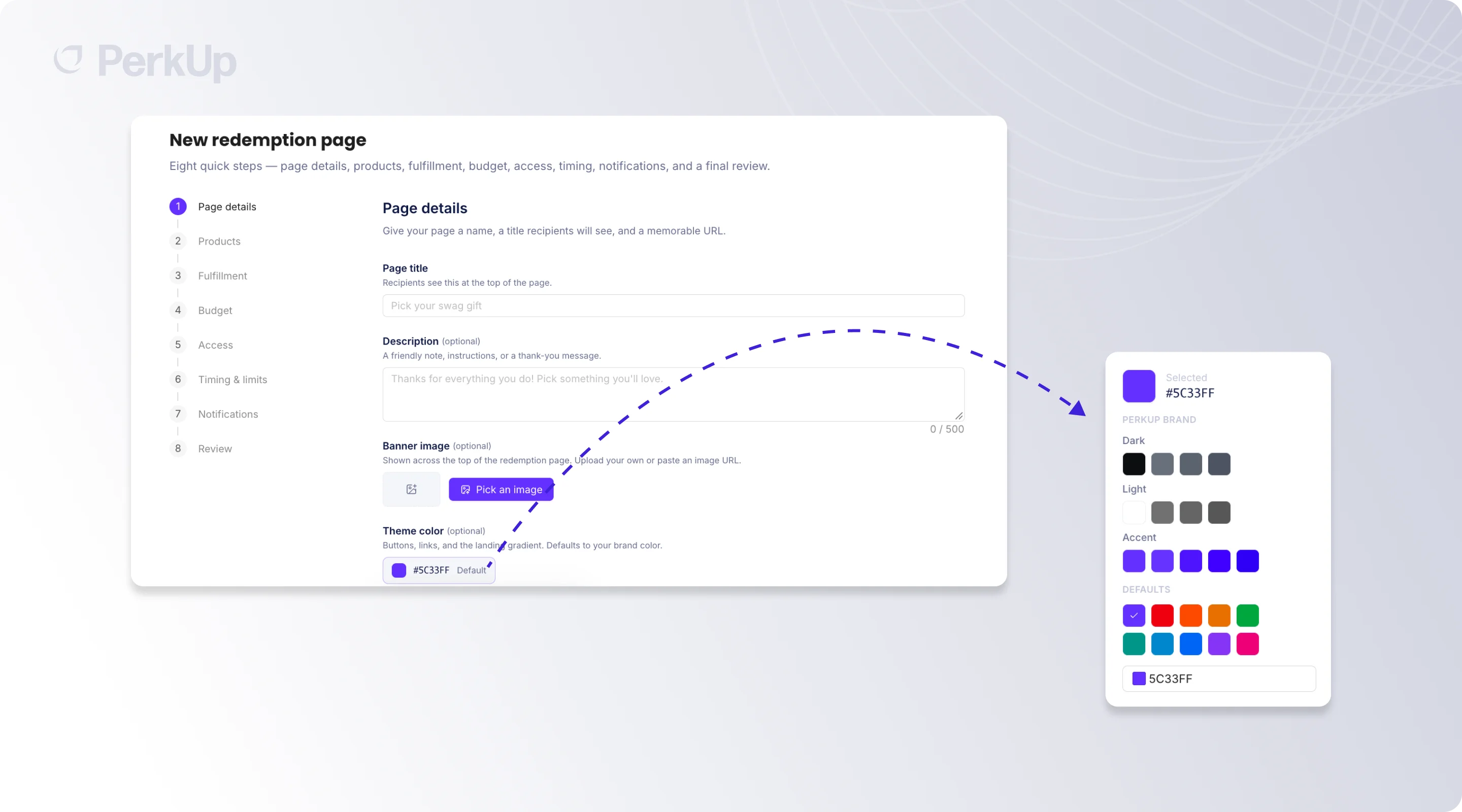
You can now choose a different theme color for each redemption page. That’s especially useful when you’re creating a page for one conference, client, or swag drop and want it to look different from the rest of your pages.

For example, you can match a client’s redemption page to their brand colors without changing anything on your other pages.

If you don’t select a color, the page will use your organization’s primary brand color from your Branding page.

  1. Exclude a group from your automation rules

You can now exclude labels from automation rules. In the Recipients section of a rule, choose the labels you want and set them to include or exclude.

So if the rule should go to everyone except contractors, you can exclude that label instead of selecting every other group manually. You can do the same if you want to leave out one country or another small group from a larger send.

  1. Pin and reorder products in your collection
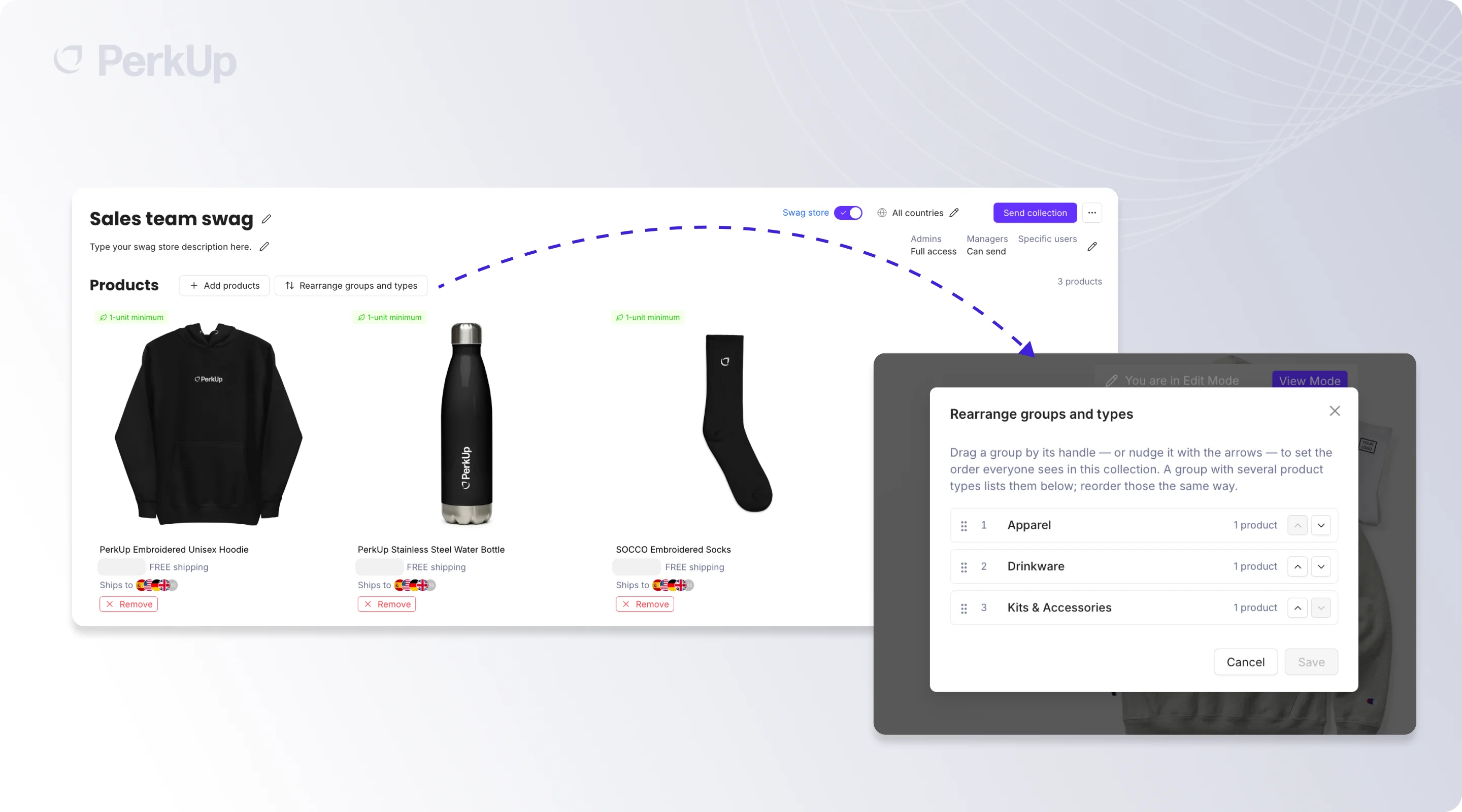
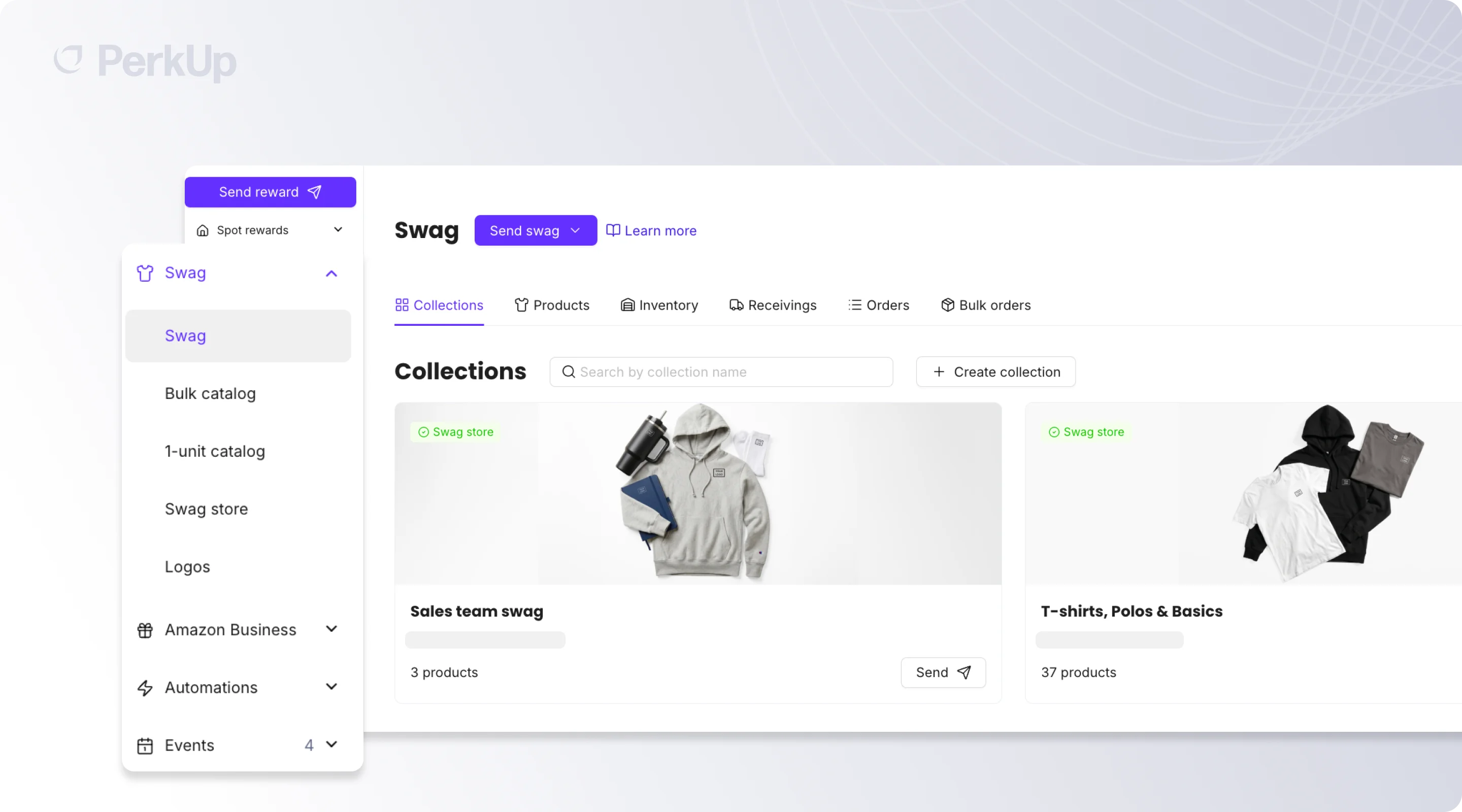
You can also decide what swag items your employees see first when they open a swag collection. To do this, you simply need to open the collection in edit mode, and you can change the order of the categories. If there are specific swag items you want at the top, pin them and arrange those items in whatever order you want. So if you want the quarter-zip to show before everything else, you can put it there.

  1. Keep Amazon Business for admins only

If your admins use Amazon Business to send rewards but you don’t want members shopping from the Amazon Business store themselves, you can now separate those permissions.

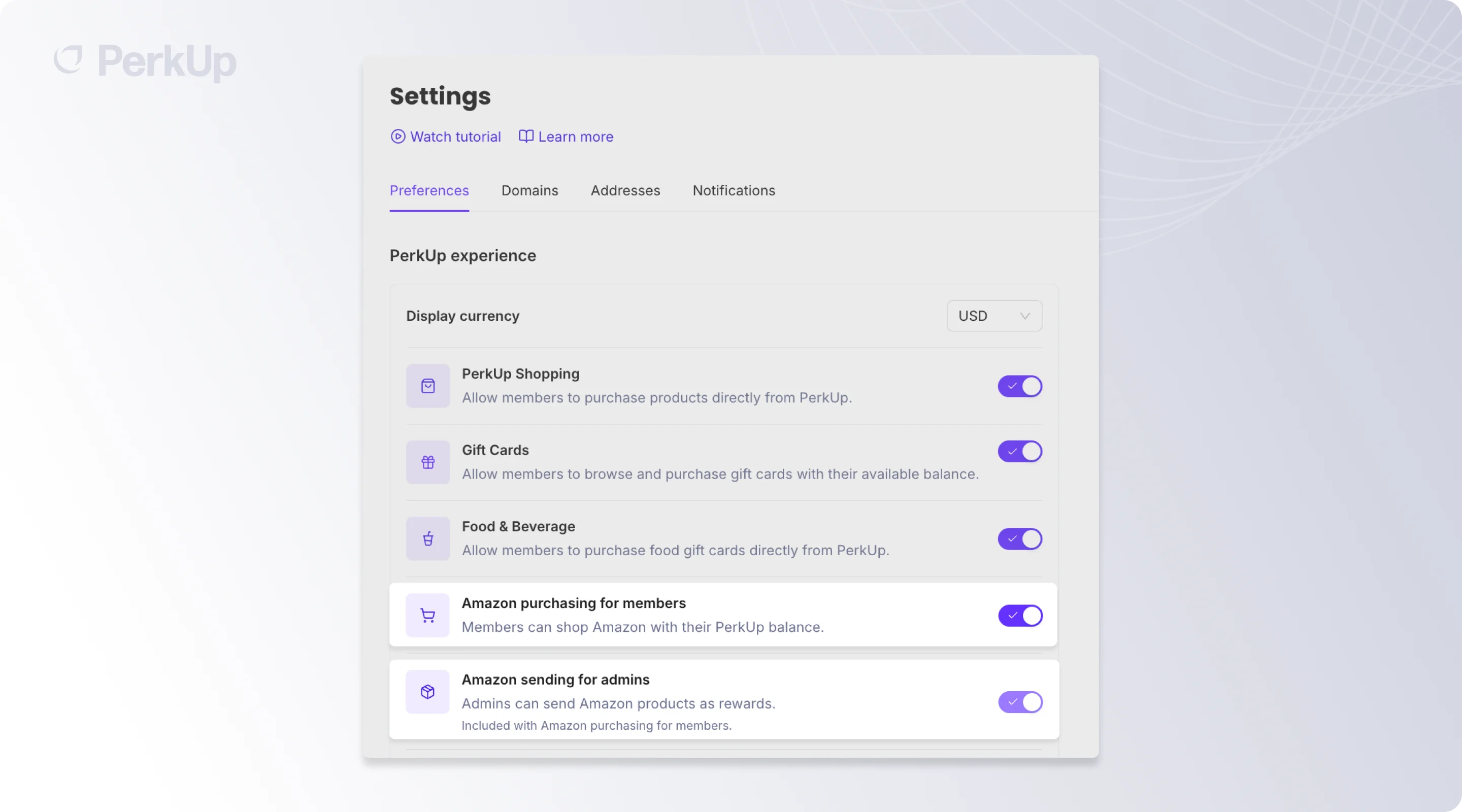
How can you do this? Simple, just go to Settings → Preferences. You’ll see two toggles: Amazon purchasing for members and Amazon sending for admins. Turn member purchasing off and leave admin sending on.

Your admins can still browse the Amazon Business catalog, add products to collections, and send Amazon Business items as rewards. Your recipients can redeem them the same way they do now, while members won’t see the Amazon Business store.


Why Use PerkUp for Swag

When you’re ordering swag (whether that’s for an event or employee gifting or anything else), you’re usually managing a few things at the same time. You need to decide what to order, make sure it gets produced on time, ship it to the venue or recipients, and then figure out what to do with anything left over. You can manage that whole process in PerkUp.

Start with what you want at the event or for your campaign. You can place your main order through bulk swag, add an item through On Demand when you only need a smaller quantity, or work with our custom sourcing team if you need something you can’t find in the catalog. If you already have the idea but need help turning it into artwork, our in-house design team can handle the mockups as well!

Then you can plan fulfillment based on where the event is happening or where your recipients are located. PerkUp has warehouses and suppliers across the US, Canada, Mexico, the UK, Europe, India, China, Hong Kong, and Australia, with delivery to 65+ countries. When you do need to ship internationally, PerkUp handles shipping and customs, with duties prepaid wherever possible and eligible unexpected customs charges reimbursed.

If you’ve had an event and have leftover swag items, you can send those swag inventories to a PerkUp warehouse. And you can keep using the same account for the rest of your swag program, too, whether you’re sending new hire kits, giving employees access to a swag store, or automating work anniversary and birthday gifts.

You can also connect PerkUp with your HR tools through 200+ integrations, so a start date or anniversary in your HRIS can trigger a swag send without you or someone on your team tracking it manually.

If you have an event coming up, bring us the date, the cities, and what you want to send. Book a demo, and we can walk through the order-by dates with you!


Frequently Asked Questions About Swag Orders

How far in advance should I order swag?

It depends on what you’re ordering. A custom swag item made overseas will usually need more time than something printed in the US. When you add a swag item to an event in PerkUp, you’ll see an order-by date based on its production time, shipping location, and proofing. That’s the last day you can order it and still make your delivery window.

What happens if I order after the order-by date?

You’ll see the issue before you place the order. If something can’t arrive within your event window, the approver will see which swag item is causing the delay and by how many days it's delayed. They can still decide whether to continue with the order.

Can I ship event swag internationally?

Yes! You’ll see the available shipping services at checkout, along with a delivery estimate based on the option you choose.

Can I send an automated gift to everyone except one group?

Yes. In the Recipients section of a rule, select the label you want to leave out and set it to exclude. For example, you can send to everyone except contractors without selecting every other group individually.

A lot of swag work comes down to small questions. What’s the last day you can order something and still get it in time for an event? Can it ship faster to another country? Can this anniversary rule skip contractors? Can your admins send Amazon Business products without opening the store to everyone?

Until now, you’d have to check each one separately and keep track of it yourself.

We made a few updates to make that easier. You can now see the last day to order each swag item for an event, based on a delivery window. If you’re shipping warehoused swag from the US internationally, you can choose your shipping service at checkout. You can also give each redemption page its own color, exclude groups from automation rules, choose which swag items appear first in a collection, and keep Amazon Business purchasing limited to admins.

Here’s how each one works.


What’s new in PerkUp swag orders?

  1. Check the last day to order for your event

Say you have a conference in Berlin on the 28th. You need hoodies that are already sitting in a PerkUp warehouse in the US, stickers printed in Ohio, and a custom plushie made in China. You can probably wait a little longer to order the stickers, but not the plushie.

When you add a swag item to an event order, you’ll now see an order-by date. That’s the last day you can place the order and still have it arrive within your delivery window. PerkUp calculates the date based on the swag item’s production time, where it ships from, and how much time you’ll need for proofing. 

You’ll also see order-by dates for bulk orders and warehouse orders (swag you already have warehoused with PerkUp). Additionally, you can also see the full timeline on the event page.

So you’ll see a different deadline for the plushie and the stickers instead of trying to work backward from one event date yourself.

  1. Choose faster shipping for international orders

Last month, we added faster shipping methods for US orders. Now you have more options when you ship internationally, too!  If you’re sending swag warehoused with PerkUp in the US to another country, you can choose the carrier and service based on when you need the order to arrive. You’ll also see a delivery estimate based on the option you select before you place the order. 


Other PerkUp Updates

Maybe you’re setting up a redemption page for one client and want it to look different from your other pages. Or you want an anniversary rule to go to everyone except contractors. Or there’s one quarter-zip you want employees to see first in a collection. Or your admins need to send Amazon Business products as rewards, but you don’t want every member to have access to the Amazon Business store.

You can now handle each of those much easier. Here’s how:

  1. Give each redemption page its own color

You can now choose a different theme color for each redemption page. That’s especially useful when you’re creating a page for one conference, client, or swag drop and want it to look different from the rest of your pages.

For example, you can match a client’s redemption page to their brand colors without changing anything on your other pages.

If you don’t select a color, the page will use your organization’s primary brand color from your Branding page.

  1. Exclude a group from your automation rules

You can now exclude labels from automation rules. In the Recipients section of a rule, choose the labels you want and set them to include or exclude.

So if the rule should go to everyone except contractors, you can exclude that label instead of selecting every other group manually. You can do the same if you want to leave out one country or another small group from a larger send.

  1. Pin and reorder products in your collection

You can also decide what swag items your employees see first when they open a swag collection. To do this, you simply need to open the collection in edit mode, and you can change the order of the categories. If there are specific swag items you want at the top, pin them and arrange those items in whatever order you want. So if you want the quarter-zip to show before everything else, you can put it there.

  1. Keep Amazon Business for admins only

If your admins use Amazon Business to send rewards but you don’t want members shopping from the Amazon Business store themselves, you can now separate those permissions.

How can you do this? Simple, just go to Settings → Preferences. You’ll see two toggles: Amazon purchasing for members and Amazon sending for admins. Turn member purchasing off and leave admin sending on.

Your admins can still browse the Amazon Business catalog, add products to collections, and send Amazon Business items as rewards. Your recipients can redeem them the same way they do now, while members won’t see the Amazon Business store.


Why Use PerkUp for Swag

When you’re ordering swag (whether that’s for an event or employee gifting or anything else), you’re usually managing a few things at the same time. You need to decide what to order, make sure it gets produced on time, ship it to the venue or recipients, and then figure out what to do with anything left over. You can manage that whole process in PerkUp.

Start with what you want at the event or for your campaign. You can place your main order through bulk swag, add an item through On Demand when you only need a smaller quantity, or work with our custom sourcing team if you need something you can’t find in the catalog. If you already have the idea but need help turning it into artwork, our in-house design team can handle the mockups as well!

Then you can plan fulfillment based on where the event is happening or where your recipients are located. PerkUp has warehouses and suppliers across the US, Canada, Mexico, the UK, Europe, India, China, Hong Kong, and Australia, with delivery to 65+ countries. When you do need to ship internationally, PerkUp handles shipping and customs, with duties prepaid wherever possible and eligible unexpected customs charges reimbursed.

If you’ve had an event and have leftover swag items, you can send those swag inventories to a PerkUp warehouse. And you can keep using the same account for the rest of your swag program, too, whether you’re sending new hire kits, giving employees access to a swag store, or automating work anniversary and birthday gifts.

You can also connect PerkUp with your HR tools through 200+ integrations, so a start date or anniversary in your HRIS can trigger a swag send without you or someone on your team tracking it manually.

If you have an event coming up, bring us the date, the cities, and what you want to send. Book a demo, and we can walk through the order-by dates with you!


Frequently Asked Questions About Swag Orders

How far in advance should I order swag?

It depends on what you’re ordering. A custom swag item made overseas will usually need more time than something printed in the US. When you add a swag item to an event in PerkUp, you’ll see an order-by date based on its production time, shipping location, and proofing. That’s the last day you can order it and still make your delivery window.

What happens if I order after the order-by date?

You’ll see the issue before you place the order. If something can’t arrive within your event window, the approver will see which swag item is causing the delay and by how many days it's delayed. They can still decide whether to continue with the order.

Can I ship event swag internationally?

Yes! You’ll see the available shipping services at checkout, along with a delivery estimate based on the option you choose.

Can I send an automated gift to everyone except one group?

Yes. In the Recipients section of a rule, select the label you want to leave out and set it to exclude. For example, you can send to everyone except contractors without selecting every other group individually.

A lot of swag work comes down to small questions. What’s the last day you can order something and still get it in time for an event? Can it ship faster to another country? Can this anniversary rule skip contractors? Can your admins send Amazon Business products without opening the store to everyone?

Until now, you’d have to check each one separately and keep track of it yourself.

We made a few updates to make that easier. You can now see the last day to order each swag item for an event, based on a delivery window. If you’re shipping warehoused swag from the US internationally, you can choose your shipping service at checkout. You can also give each redemption page its own color, exclude groups from automation rules, choose which swag items appear first in a collection, and keep Amazon Business purchasing limited to admins.

Here’s how each one works.


What’s new in PerkUp swag orders?

  1. Check the last day to order for your event

Say you have a conference in Berlin on the 28th. You need hoodies that are already sitting in a PerkUp warehouse in the US, stickers printed in Ohio, and a custom plushie made in China. You can probably wait a little longer to order the stickers, but not the plushie.

When you add a swag item to an event order, you’ll now see an order-by date. That’s the last day you can place the order and still have it arrive within your delivery window. PerkUp calculates the date based on the swag item’s production time, where it ships from, and how much time you’ll need for proofing. 

You’ll also see order-by dates for bulk orders and warehouse orders (swag you already have warehoused with PerkUp). Additionally, you can also see the full timeline on the event page.

So you’ll see a different deadline for the plushie and the stickers instead of trying to work backward from one event date yourself.

  1. Choose faster shipping for international orders

Last month, we added faster shipping methods for US orders. Now you have more options when you ship internationally, too!  If you’re sending swag warehoused with PerkUp in the US to another country, you can choose the carrier and service based on when you need the order to arrive. You’ll also see a delivery estimate based on the option you select before you place the order. 


Other PerkUp Updates

Maybe you’re setting up a redemption page for one client and want it to look different from your other pages. Or you want an anniversary rule to go to everyone except contractors. Or there’s one quarter-zip you want employees to see first in a collection. Or your admins need to send Amazon Business products as rewards, but you don’t want every member to have access to the Amazon Business store.

You can now handle each of those much easier. Here’s how:

  1. Give each redemption page its own color

You can now choose a different theme color for each redemption page. That’s especially useful when you’re creating a page for one conference, client, or swag drop and want it to look different from the rest of your pages.

For example, you can match a client’s redemption page to their brand colors without changing anything on your other pages.

If you don’t select a color, the page will use your organization’s primary brand color from your Branding page.

  1. Exclude a group from your automation rules

You can now exclude labels from automation rules. In the Recipients section of a rule, choose the labels you want and set them to include or exclude.

So if the rule should go to everyone except contractors, you can exclude that label instead of selecting every other group manually. You can do the same if you want to leave out one country or another small group from a larger send.

  1. Pin and reorder products in your collection

You can also decide what swag items your employees see first when they open a swag collection. To do this, you simply need to open the collection in edit mode, and you can change the order of the categories. If there are specific swag items you want at the top, pin them and arrange those items in whatever order you want. So if you want the quarter-zip to show before everything else, you can put it there.

  1. Keep Amazon Business for admins only

If your admins use Amazon Business to send rewards but you don’t want members shopping from the Amazon Business store themselves, you can now separate those permissions.

How can you do this? Simple, just go to Settings → Preferences. You’ll see two toggles: Amazon purchasing for members and Amazon sending for admins. Turn member purchasing off and leave admin sending on.

Your admins can still browse the Amazon Business catalog, add products to collections, and send Amazon Business items as rewards. Your recipients can redeem them the same way they do now, while members won’t see the Amazon Business store.


Why Use PerkUp for Swag
When you’re ordering swag (whether that’s for an event or employee gifting or anything else), you’re usually managing a few things at the same time. You need to decide what to order, make sure it gets produced on time, ship it to the venue or recipients, and then figure out what to do with anything left over. You can manage that whole process in PerkUp.

Start with what you want at the event or for your campaign. You can place your main order through bulk swag, add an item through On Demand when you only need a smaller quantity, or work with our custom sourcing team if you need something you can’t find in the catalog. If you already have the idea but need help turning it into artwork, our in-house design team can handle the mockups as well!

Then you can plan fulfillment based on where the event is happening or where your recipients are located. PerkUp has warehouses and suppliers across the US, Canada, Mexico, the UK, Europe, India, China, Hong Kong, and Australia, with delivery to 65+ countries. When you do need to ship internationally, PerkUp handles shipping and customs, with duties prepaid wherever possible and eligible unexpected customs charges reimbursed.

If you’ve had an event and have leftover swag items, you can send those swag inventories to a PerkUp warehouse. And you can keep using the same account for the rest of your swag program, too, whether you’re sending new hire kits, giving employees access to a swag store, or automating work anniversary and birthday gifts.

You can also connect PerkUp with your HR tools through 200+ integrations, so a start date or anniversary in your HRIS can trigger a swag send without you or someone on your team tracking it manually.

If you have an event coming up, bring us the date, the cities, and what you want to send. Book a demo, and we can walk through the order-by dates with you!


Frequently Asked Questions About Swag Orders

How far in advance should I order swag?

It depends on what you’re ordering. A custom swag item made overseas will usually need more time than something printed in the US. When you add a swag item to an event in PerkUp, you’ll see an order-by date based on its production time, shipping location, and proofing. That’s the last day you can order it and still make your delivery window.

What happens if I order after the order-by date?

You’ll see the issue before you place the order. If something can’t arrive within your event window, the approver will see which swag item is causing the delay and by how many days it's delayed. They can still decide whether to continue with the order.

Can I ship event swag internationally?

Yes! You’ll see the available shipping services at checkout, along with a delivery estimate based on the option you choose.

Can I send an automated gift to everyone except one group?

Yes. In the Recipients section of a rule, select the label you want to leave out and set it to exclude. For example, you can send to everyone except contractors without selecting every other group individually.

import { useEffect } from "react"


export default function CarouselFixer() {

useEffect(() => {

// Wait for CMS content to render

const init = () => {

// Find all horizontally scrollable containers inside CMS content

const contents = document.querySelectorAll(".framer-text, [class*='content'], [class*='Content']")


contents.forEach((content) => {

const scrollEls = content.querySelectorAll("ul, ol, div")

scrollEls.forEach((el) => {

const htmlEl = el as HTMLElement

const style = window.getComputedStyle(htmlEl)


// Target only elements that overflow horizontally (the carousel)

if (

style.overflowX === "scroll" ||

style.overflowX === "auto" ||

htmlEl.scrollWidth > htmlEl.clientWidth

) {

attachScrollBehavior(htmlEl)

}

})

})

}


const attachScrollBehavior = (el: HTMLElement) => {

// Prevent double-attaching

if (el.dataset.scrollFixed) return

el.dataset.scrollFixed = "true"


el.style.cursor = "grab"

el.style.userSelect = "none"

el.style.webkitOverflowScrolling = "touch"

el.style.scrollbarWidth = "none"


let startX = 0

let scrollStart = 0

let isDown = false

let dragged = false


const onMouseDown = (e: MouseEvent) => {

isDown = true

dragged = false

startX = e.clientX

scrollStart = el.scrollLeft

el.style.cursor = "grabbing"

}


const onMouseMove = (e: MouseEvent) => {

if (!isDown) return

const dx = e.clientX - startX

if (Math.abs(dx) > 5) dragged = true

el.scrollLeft = scrollStart - dx

}


const onMouseUp = () => {

isDown = false

el.style.cursor = "grab"

}


const onClickCapture = (e: MouseEvent) => {

if (dragged) {

e.preventDefault()

e.stopImmediatePropagation()

dragged = false

}

}


const onWheel = (e: WheelEvent) => {

if (Math.abs(e.deltaX) > 0) {

e.preventDefault()

el.scrollLeft += e.deltaX

}

}


el.addEventListener("mousedown", onMouseDown)

el.addEventListener("mousemove", onMouseMove)

el.addEventListener("mouseup", onMouseUp)

el.addEventListener("mouseleave", onMouseUp)

el.addEventListener("click", onClickCapture, true)

el.addEventListener("wheel", onWheel, { passive: false })

}


// Try immediately, then retry after delays to catch late CMS renders

init()

setTimeout(init, 500)

setTimeout(init, 1500)

}, [])


// Renders nothing — invisible helper

return null

}

Start sending incredible swag and gifts globally

Simplify and enhance your event swag and gifting experience for better retention, engagement and productivity.

Start sending incredible swag and gifts globally

Simplify and enhance your event swag and gifting experience for better retention, engagement and productivity.

Start sending incredible swag and gifts globally

Simplify and enhance your event swag and gifting experience for better retention, engagement and productivity.